
Ever imagined a human body with its body parts located differently? It won’t look good at all; instead it will look weird or horrible. Similarly, a beautiful web content is worth reading only, if it has well located headings and paragraphs.
HTML Heading
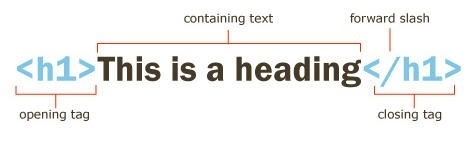
A book without a cover cannot reflect what it owns. Similar applies to a webpage without a heading. Therefore, it is very important for a webpage to give a heading using HTML.
HTML Heading Tags
Tags ranging from <h1> to <h6> are used for the heading that includes <h1>, <h2>, <h3>, <h4>, <h5> and <h6>.
Usually, <h1> tags are preferred utmost whereas <h6> at least.
Example:
<h1>Tech Dot Blogs</h1>
<h2>Tech Dot Blogs</h2>
.
.
.
<h6>Tech Dot Blogs</h6>
Facts:
- A margin space is added automatically before and after every single heading.
- The content and structure of the web page gets indexed on search engines using headings.
- Headings should not be used to make the text bold, instead it should be only used for give the headings only.
- Headings give an ease to readers to understand the content.
- For main heading <h1> tag should be used which can be further followed by <h2>, <h3>, <h4> and so on depending upon their priorities.
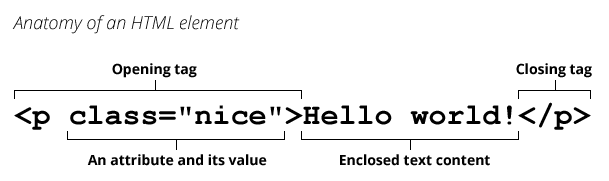
- Always use end tag. Example: </h1> with <h1>, </p> with <p>, etc.
Horizontal Spaces
<hr> tags are used to add a line space between two consecutive contents or lines.
Example:
<p>Tech Dot Blogs</p>
<hr>
<p> Tech Dot Blogs</p>
<hr>
<p> Tech Dot Blogs</p>
HTML <head>
Although <head> do not play a crucial role within HTML headings, but it contains meta data which is not visible.
The <head> tag is used between <html> and <body> tags as shown below in example:
Example:
<!DOCTYPE html>
<html>
<head>
<title>Tech Dot Blogs</title>
<meta charset=”UTF-8″>
</head>
<body>
HTML </title>
Again, <title> is a meta data that defines the title of any HTML document. It usually does not appear in the document, but displayed in browser.
HTML <meta>
As the tag reflects, <meta> is also a meta data. It is used to define the character set and other important information of the document.
HTML <style>
<style> is used to define the internal CSS style sheets.
HTML <link>
<link> is used to define the external CSS style sheets.
Tip:
Shortcut keys to view HTML Source Page: CTRL + U.
HTML Paragraphs
Have you ever tried to read a 500 or 1000 words content written with in a single paragraph? NO? WHY? Let me tell you, ‘why’. A well written webpage drives the huge number of readers to read the content. So, always use <p> tag to define a paragraph.
Example:
<p>Tech Dot Blogs</p>
<p>We welcome you on our page.</p>
Output:
Tech Dot Blogs
We welcome you on our page.
Using a <p> tag will add an empty line between two paragraphs.
Fact:
- While writing a HTML code, you cannot know how HTML will be displayed. Results at the time of execution may vary depending upon the size of screens and windows.
- By adding an extra line between the texts won’t make any difference at the output. Only tags could make. However, extra spaces between each word will affect the output content.
Example:
<p>Tech Dot Blogs is a website that will help you to explore everything about technology.</p>
Output:
Tech Dot Blogs is a website that will help you to explore everything about technology.
Example:
<p>Technology Diving is a website that will help you to explore everything about technology.</p>
Output:
Technology Diving is a website that will help you to explore everything about technology.
HTML <br>
<br> tag is used to give a line break between two sentences. You can give a line break without starting a new paragraph.
<br> tag does not require its end tag i.e., </br>.
Example:
< p>Tech Dot Blogs is a website<br> that will help you <br>to explore everything about technology</p>.
Output:
Tech Dot Blogs is a website that will help you to explore everything about technology.
HTML <pre>
<pre> tag is used for displaying fixed-width font (Courier) that have predefined spaces and lines breaks.
Example:
<pre>Tech Dot Blogs is a website that will help you to explore everything about technology.</pre>
A beautiful web content is worth reading only, if it has well located headings and paragraphs. HTML can do it with just a few tags.